Guides · Reading guide
Reading on iPhone Duo, like a book.
Why the fold suits a book, what Facing Pages does open, half closed, upright and shut, how to use the hinge to need less translation, and what to look for in any app on the Duo.
October 23, 2026
Closed, the iPhone Duo is about the size of a passport, Apple says. Open, it’s 6.48 inches wide and 4.64 inches tall, a screen wider than it is high with a fold running down the middle. Most apps treat that fold as something to hide. Hold the Duo open in both hands, though, and the fold sits where a book’s spine would.
A spine has a page on each side, and if you’re learning a language, those two pages can hold two languages: the story you’re learning to read on the left and your own language facing it, the way printers have set bilingual editions for more than a century. Facing Pages, the app we make, lays out its stories that way on the Duo and responds to each position you put it in: open flat, half closed, turned upright and shut.
The short answer
The iPhone Duo is the first iPhone that opens like a book, and an app that reads well on it treats the fold as a spine and sets a separate page on each side. In Facing Pages, the open Duo shows a story in the language you’re learning on the left and your own language on the right, matched sentence by sentence; tap a sentence and its partner lights up across the fold. Closed, the cover screen shows one page, and the translation slides up only for the sentence you tap.
Use the hinge as a difficulty dial. Read open while a story is a step above you, and closed once it isn’t.
Facing Pages · bilingual stories
Stories that open like a book on iPhone Duo
228 original stories in Spanish, French and English, with your own language on the facing page, matched sentence by sentence. The first episode of every series is free, and there’s no account to make.



Reading this on a computer?
Scan the code with your phone’s camera. It opens the App Store or Google Play, whichever your phone uses. No account needed.
Or text yourself the linkThe fold as a spine
A 7.6-inch screen is too wide for one comfortable line of text. Line length is an old argument among typographers, and most of them quote the figures in Robert Bringhurst’s The Elements of Typographic Style (1992): 45 to 75 characters for a single column, and 40 to 50 for text set in columns. Run a story across the whole open Duo, at a size you’d read in your hand, and a line comes to roughly 80 characters. Your eye has a long way to travel back to find the next one. Split at the fold, each page of a Facing Pages story holds about 35 to 40.
Splitting at the fold gets you two things: a line short enough for your eye to track, and a second page to put something on. Apple uses that second page for Split View, new to iPhone with iOS 27, which sets two apps side by side on the inner display. Facing Pages puts the same story there in your own language.
The crease is real, though. Apple says the inner display’s nano-texture finish “minimizes crease visibility,” and it says nothing about removing the crease, so Facing Pages keeps every word off it. The app splits its pages along the strip iOS reserves at the fold: text stops short on one side and starts again on the other, the way it does at the gutter of a printed book. Only the photograph at the top of each story runs across both pages, like the plate at the start of a chapter.
Open: two languages, one spread
Open the Duo flat, hold it like a book, and a story lies the way a bilingual edition does: the language you’re learning on the left page, your own on the right. Our Spanish and French stories come with our own English. Read them in any of about 20 other languages instead, or read our English stories beside your own language, and the phone translates the facing page itself, in private, and offline once the language has downloaded.
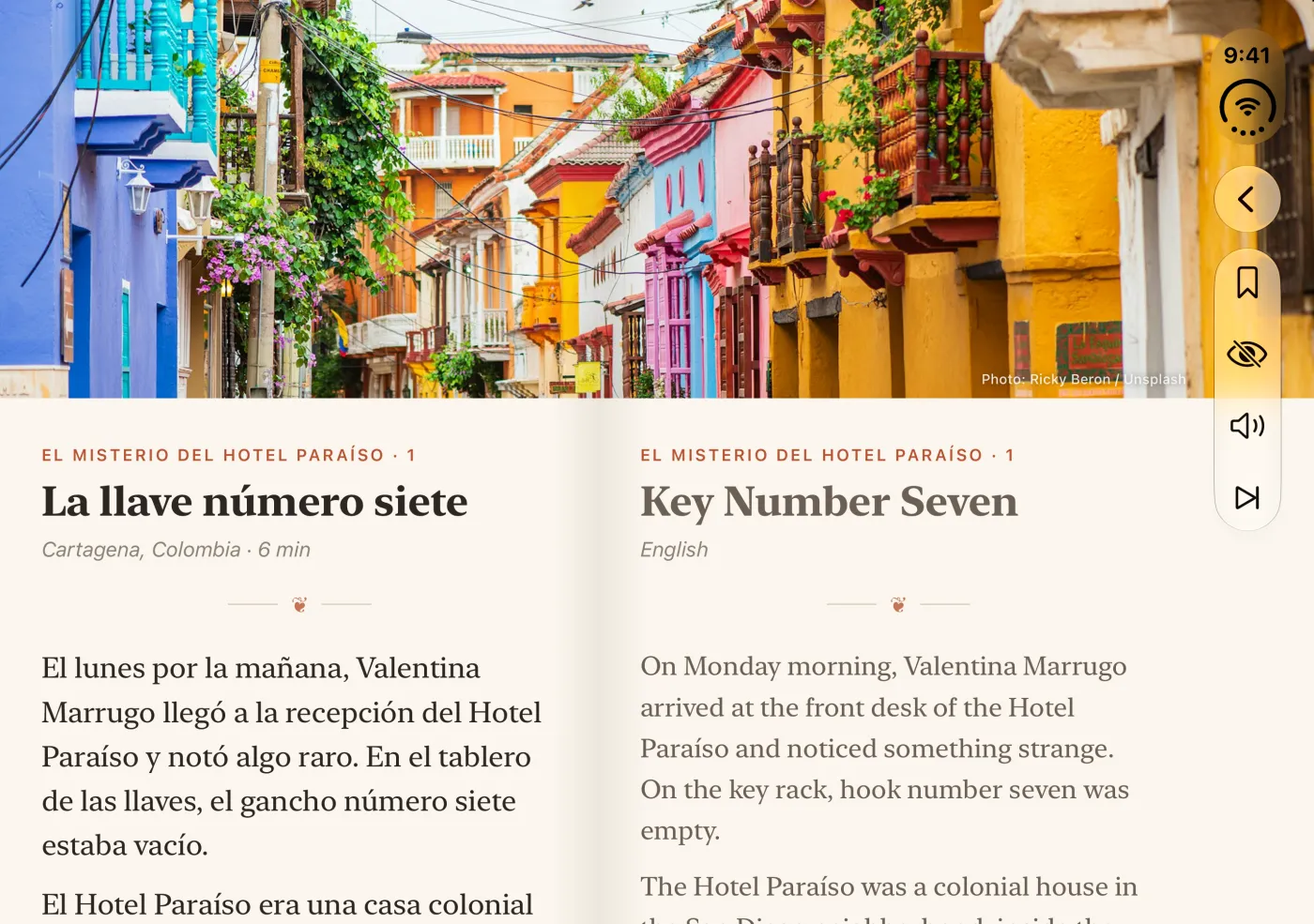
Tap a sentence and only its partner lights up across the fold, so you can check one line without reading three. Scroll either page and the other keeps pace, paragraph for paragraph. Tap a word for what it means in that sentence, with its dictionary form beside it, and save it along with the sentence you found it in. The phone’s own voices will read any sentence aloud, and Facing Pages highlights it as you hear it.
There’s one more control on the open Duo, an eye with a line through it, and it’s the most useful button in the app. It hides the translation, leaving the facing page blank below its title. Tap a sentence and its translation still appears in the panel at the bottom of the screen, so you keep the help without having it in front of you the whole time.
Half closed, and upright
Fold the Duo partway, the way you’d hold a paperback in bed, and the pages stay where they are; only the shadow along the spine changes. Facing Pages reads the angle of the hinge and deepens the shadow as you close the book, from faint with the Duo flat to four times as deep at a right angle, so a half-closed Duo looks like a half-closed book.
Give the open Duo a quarter turn, so the fold runs across the screen instead of down it, and the pages stack. The story sits above the fold and your language below it. Prop it half open in that position, like a tiny laptop on a table, and the story is on the half standing up, facing you, with the translation on the half lying flat. The photograph heads the top page only. The panel for a sentence you tap, with its translation and its words, slides up over the lower page and leaves the story above in full view.
Closed: a pocket book
Shut, the Duo is a 5.4-inch phone you can hold in one hand, and Facing Pages becomes a single page in the language you’re learning. Your own language is out of sight. Tap a sentence and its translation slides up from the bottom, with each of its words laid out as a button: tap one to look it up, or tap the speaker to hear the sentence read aloud.
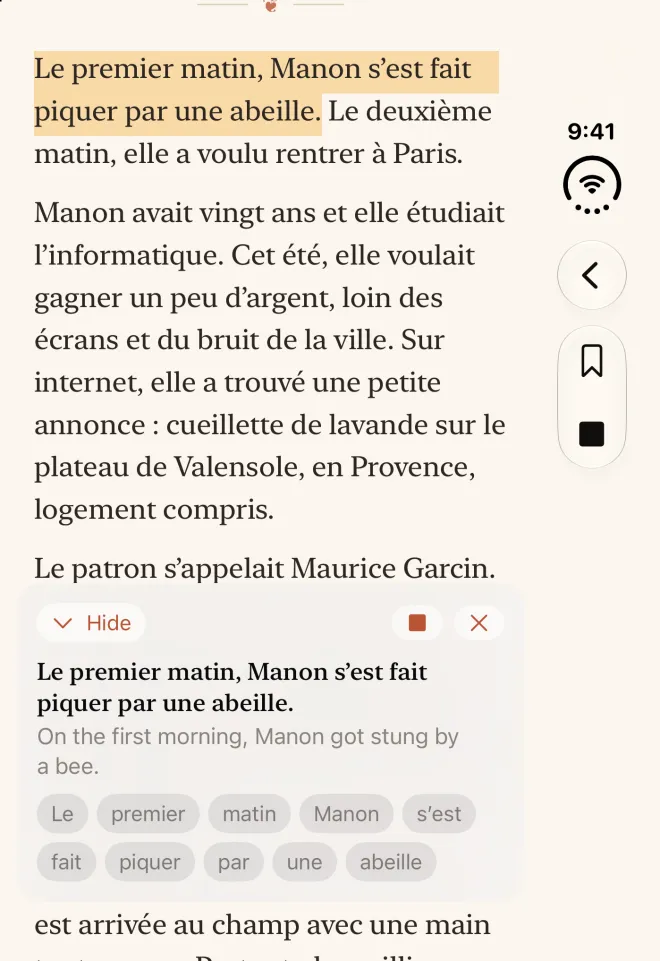
Close the Duo in the middle of a story and you keep your place. Facing Pages rebuilds the page at the paragraph you’d reached, or at the sentence you’d tapped, and when you open it again both pages come back to the same spot. You can read the easy stretches with the Duo shut, standing on a train, and unfold the book for the one paragraph that beats you.
Use the hinge as a dial
Treat the positions of the Duo as levels of help. The point of reading in a new language is to need a little less help every week, and you can use the hinge to step down one level at a time.
- Open, both pages showing, for a story a step above your level, where you’ll check a sentence or two in every paragraph. Read the left page first and look across only when a sentence won’t come clear.
- Open, translation hidden, for a story you can follow most of the way. The facing page stays blank, and any sentence you tap still shows its translation in the panel.
- Closed, for a story at your level, and for every reread. You see one language, and a translation only when you ask for it.
Put a translation beside a text and it’s easy to end up reading the translation and nodding at the original as it goes by. In a printed bilingual book you’d cover the facing page with your hand; on the Duo, you close it. Start a new story open, and close the Duo once a whole page goes by without a glance across. Our guide to parallel text has more on using a facing translation without leaning on it, and how to learn Spanish by reading sets out the order to read in.
Facing Pages · bilingual stories
Stories that open like a book on iPhone Duo
228 original stories in Spanish, French and English, with your own language on the facing page, matched sentence by sentence. The first episode of every series is free, and there’s no account to make.
Reading this on a computer?
Scan the code with your phone’s camera. It opens the App Store or Google Play, whichever your phone uses. No account needed.
Or text yourself the linkFive checks for an app on iPhone Duo
On a new shape of screen, you start out with apps designed for the old one. Before you keep an app on your Duo, open it and check five things. They matter for any app, and most of all for one you read in.
- Does any text sit in the crease? Open a page of text and look at the middle. If a word runs over the fold, you read it through a ripple. In Facing Pages each page stops at the fold.
- Does it do anything with the second half? One page stretched across both halves gives you longer lines and nothing else. Two halves can show two things, such as a page and its notes, or a text and its translation.
- Does it keep your place when you open or close it? You’ll open and shut the Duo all day, and an app that jumps back to the top each time won’t last the first week.
- Is the cover screen a real place to use it? At 5.4 inches, the closed Duo is a whole phone, and a good app works there in full without asking you to unfold.
- Does the layout change when you turn it? Apple says iOS reorients content when you turn the Duo to the side. A well-made app rearranges its layout to suit the new shape.
We built Facing Pages for the Duo first. On any other iPhone it reads the way the closed Duo does, one page with the translation a tap away, and on iPad every story is a two-page spread. It needs no account and shows no ads. The first episode of every series and a selection of stories at every level are free, and Facing Pages Premium, $5.99 a month, opens all 228.
Android foldables
The same book opens on Android. Hold a Galaxy Z Fold or a Pixel Fold like a book and Facing Pages splits its two pages along the fold itself, wherever the phone reports it to be. Turn it so the fold runs across and the pages stack, story on top. As you close the phone, the app deepens the shadow at the spine, reading the angle from the hinge sensor, and once you fold it shut the story moves to a single page on the outer screen and you keep your place. Spanish and French stories still come with our English. For other languages on the facing page, Google’s ML Kit translates on the phone, offline once each language has downloaded.
A phone that opens like a book makes help cheaper, since you can bring the translation up or put it away with a turn of the wrist, but it won’t make anyone read more. For a learner, the best use of the Duo is to need the open position a little less each week, until you open it only to start a new story.
Questions
Is iPhone Duo good for reading?
Open, it’s a 7.6-inch screen with a fold down the middle that divides it into two pages, each a comfortable width for a line of text; closed, it’s a 5.4-inch screen you can read with one hand. You’ll get the most from it in apps that treat the fold as a book’s spine, keeping text out of the crease and using each half as a page.
Can you read books on iPhone Duo?
Yes, open as a two-page book or closed as a single page. For language learners, Facing Pages sets each story across the open Duo with the language you’re learning on one page and your own on the other, matched sentence by sentence, and on the cover screen as one page with the translation a tap away.
Does iPhone Duo have a crease?
Apple says the inner display’s nano-texture finish minimizes how visible the crease is; it doesn’t say there isn’t one. Apps can keep their content off the fold, and Facing Pages ends each page at the fold so no word sits in it.
What happens when iPhone Duo is half folded?
Apple says iOS adapts content as the Duo folds. Hold it like a book and Facing Pages keeps the two pages side by side, deepening the shadow along the spine as you close it. Turn it so the fold runs across, prop it half open, and the story sits on the upright half with your language on the half lying flat.
Can iPhone Duo run two apps at once?
Yes. In iOS 27, Split View puts two apps side by side on the open Duo’s inner display, and Apple says you can save pairs of apps to come back to later.
How big is the iPhone Duo cover screen?
5.4 inches on the diagonal and 1398 by 2034 pixels, according to Apple’s specifications. Apple puts it at 90 percent of the screen area of iPhone 18 Pro. Facing Pages uses it as a single page in the language you’re learning, with the translation of any sentence a tap away.
Are foldable phones good for reading?
They can be, if the app splits at the fold. A single page stretched across a wide inner screen makes lines too long to follow with ease; two pages give you two columns of a comfortable width. On Android foldables such as the Galaxy Z Fold and Pixel Fold, Facing Pages splits along the fold as it does on iPhone Duo.
Facing Pages · bilingual stories
Stories that open like a book on iPhone Duo
228 original stories in Spanish, French and English, with your own language on the facing page, matched sentence by sentence. The first episode of every series is free, and there’s no account to make.
Reading this on a computer?
Scan the code with your phone’s camera. It opens the App Store or Google Play, whichever your phone uses. No account needed.
Or text yourself the link